Open Beta Test
Hello, necromancer!
If you earlier experienced graphic issues in the game such as weird UI distortion, blinking, etc, or/and if you have AMD Radeon video card you can help us a lot if you try new beta build, which our team made to fix graphical issues.
Please tell us, did you meet any bugs, problems, etc in this version.
How to upload the version:
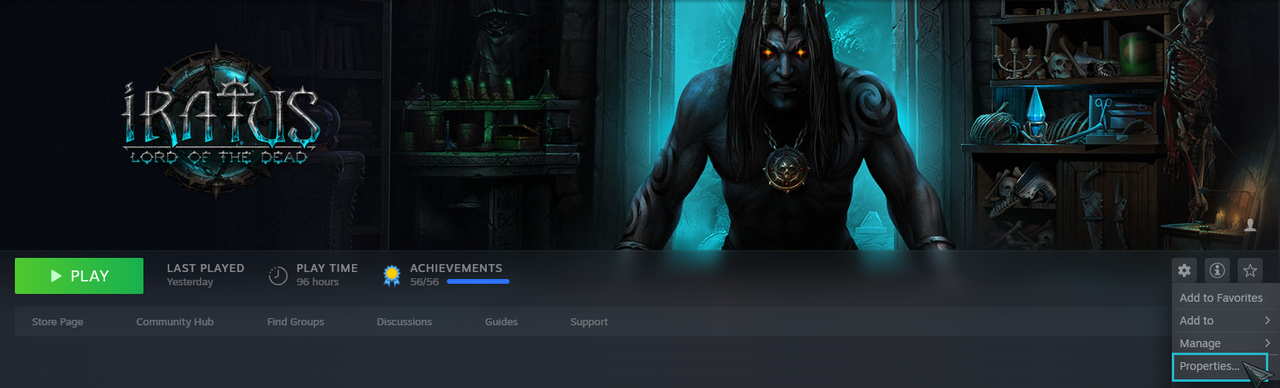
1. Open Steam and in your Library right-click (or click the gear on the right side of the game page) Iratus: Lord of the Dead. You will need to mouse over to the Properties:
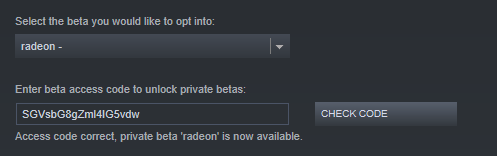
2. Open the BETAS tab and enter the key SGVsbG8gZml4IG5vdw, then select CHECK CODE:
3. In the drop-down menu choose the branch radeon, then close the window
4. Wait until Steam has finished downloading the newest version. The version name will appear in square brackets near the game name:

If it doesn’t happen, you should restart Steam. The ingame version must become 176.15